


.png)


Try Default

See how revenue teams automate revenue operations with Default.

Key Takeaways
- Marketo TAM lead-to-account matching links people to named accounts so ABM teams can track engagement at the account level, not lead-by-lead.
- Matching is probabilistic: it uses signals like domain, company data, CRM relationships, and enrichment, so confidence and governance determine whether it’s usable.
- Named accounts are the foundation. If domains and hierarchy aren’t standardized, matching creates noisy rollups and misprioritized follow-up.
- Once matches are trustworthy, Default can trigger workflows from Marketo form submissions (or Default forms) to run enrichment, routing, scheduling, and alerts—without smart-campaign sprawl or manual handoffs.
If you’re running ABM in Marketo but leads aren’t reliably tied to the right accounts, your engagement data becomes noisy. Sales can’t see true account momentum, and follow-up runs on partial signals.
Marketo lead-to-account matching (TAM) fixes this by linking people to named accounts so marketing and sales can prioritize from the same account view.
In this guide, you’ll learn how matching works, how to set up named accounts and rules to avoid false positives, and how to activate matches into routing and workflows. First, let’s define what matching is (and what it isn’t).
What is Marketo lead-to-account matching?
Marketo lead-to-account matching is a Target Account Management (TAM) feature that links individual leads to your named accounts (your target company list) so you can track and act on engagement at the account level.
What it enables:
- account-level engagement across the buying team
- cleaner ABM reporting (coverage, engagement, influence)
- segmentation and prioritization by account tier
- better coordination between marketing activity and sales follow-up
It’s worth pointing out that this isn’t standard CRM lead-to-account logic. CRM relationships are built for ownership and hierarchy in the system of record; TAM matching is built for account-based engagement and measurement inside Marketo.
How Marketo lead-to-account matching works
Marketo lead-to-account matching uses a set of signals to determine whether a lead belongs to a specific named account. Some signals are strong identifiers. Others are inference-based and should be treated as lower confidence, especially if your data is inconsistent.
#1: Email domain match
Marketo matches a lead to a named account based on the email domain (for example, @company.com). This is often the strongest indicator in B2B when employees use a standardized corporate email address.
Where it breaks:
- personal domains (Gmail, Outlook) create no usable domain signal
- large enterprises may have multiple domains by region, brand, or acquisition
- shared or ambiguous domains can introduce false positives if not governed
#2: Company name normalization
Marketo can use the lead’s Company field to match against account names. It works best when company naming is standardized across sources.
Where it breaks:
- free-text entry creates variants (abbreviations, punctuation, legal suffixes)
- event lists and inbound forms often contain inconsistent formatting
- sales-entered values can drift from naming conventions over time
#3: CRM account relationships (when synced)
If Marketo is connected to a CRM, existing account relationships can reinforce match confidence, particularly when CRM account structure is clean and deduplicated.
Where it breaks:
- duplicate CRM accounts create competing matches
- inconsistent parent-child modeling changes what “the right account” means
- subsidiaries may need to map differently depending on your ABM strategy
#4: Website and form-fill indicators
In some setups, Marketo can infer association from behavioral or form-level firmographic clues (for example, a form submission with company details when email is not yet corporate).
Where it breaks:
- behavior does not reliably confirm legal entity (consultants, agencies, shared devices)
- firmographic fields can be incomplete or manually entered
- these signals should rarely be used for high-confidence activation on their own
#5: Data enrichment and firmographic attributes
Enrichment fields (domain metadata, industry, size, HQ location) can strengthen matching and expand coverage when combined with stronger identifiers.
Where it breaks:
- enrichment can be stale, incomplete, or conflicting across providers
- similar company names (franchises, resellers, brand families) can create false positives
- enrichment-only matches can inflate “engaged accounts” if not gated by confidence
Bottom line: the most reliable matches come from direct identifiers (domain plus clean account structure). The risk comes from operationalizing weak matches as if they were truth. Confidence thresholds and regular review are what keep TAM usable for routing, alerts, and sales execution.
Named accounts and where matching happens
In Marketo TAM, named accounts are the companies you explicitly define as ABM targets (or priority accounts). They are the anchor layer for account-based reporting and activation inside Marketo: engagement, coverage, and account performance all roll up to this list.
Named accounts often align to CRM accounts, but they don’t need to be a perfect 1:1 mirror. TAM is built to support how your GTM team wants to group and measure accounts for ABM, even when CRM structure is messy or optimized for different reporting needs.
Lead-to-account matching connects individual people to these named account groupings so you can:
- roll up engagement across the buying team instead of tracking disconnected people
- track account coverage (known contacts versus gaps)
- prioritize accounts based on activity and fit, not isolated lead scores
- coordinate marketing and sales actions using the same account context
The key point: matching “lands” on named accounts. If your named account layer is inconsistent (wrong domains, unclear parent/child strategy, duplicate definitions), your account insights will be unreliable, no matter how good the matching rules look.
How to set up Marketo lead-to-account matching
Setting up Marketo lead-to-account matching is less about flipping a switch and more about making sure your named accounts, match rules, and confidence signals are stable enough to use in real GTM workflows.
Step #1: Confirm TAM access and prerequisites
Start by confirming Target Account Management (TAM) is enabled in your Marketo instance and that you have the permissions required to manage named accounts and matching settings.
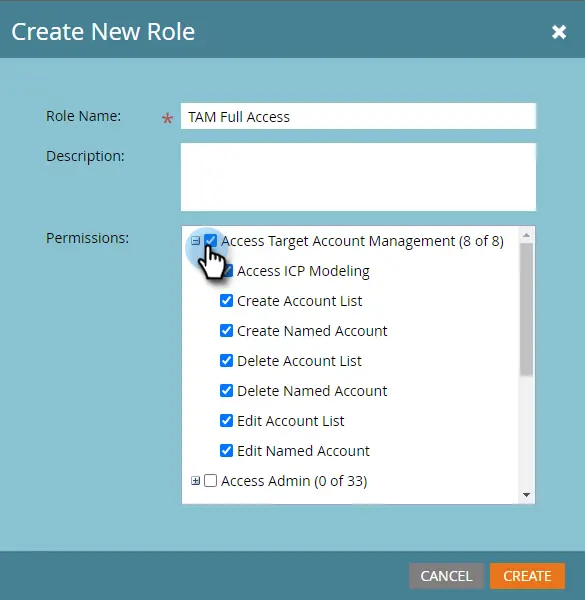
Before you tune any rules, validate the inputs TAM depends on:
- lead identity fields: email, company, and any domain-related fields you rely on
- CRM sync fundamentals (if applicable): account ownership, hierarchy model, and dedupe hygiene
- your GTM definition of “an account”: parent-level targeting, subsidiary-level targeting, or a hybrid model
If these are weak, matching will amplify the mess and make ABM reporting less trustworthy.
Step #2: Build and govern your named accounts
Next, create and standardize your named accounts. This becomes your ABM source of truth; the list you want engagement reporting, prioritization, and orchestration built around.
To keep matching reliable:
- standardize naming conventions (and avoid multiple names for the same entity)
- define a parent vs subsidiary strategy that matches how sales owns and works accounts
- maintain an approved domain list per account, including known secondary domains for multi-entity organizations
- decide how you’ll handle acquisitions and rebrands so domains and account mapping don’t drift
The more intentional your named accounts are, the fewer false matches you’ll have to unwind later.
Step #3: Validate proposed matches using strong signals first
Once named accounts are in place, Marketo will begin proposing lead-to-account matches. Review the strongest match types first (typically corporate email domains and CRM-backed relationships) before you trust weaker signals.
Focus your review on:
- high-confidence matches that are safe to activate operationally
- obvious false positives (similar company names, shared domains, resellers, agencies)
- coverage gaps where the account is correct but the lead lacks strong identifiers
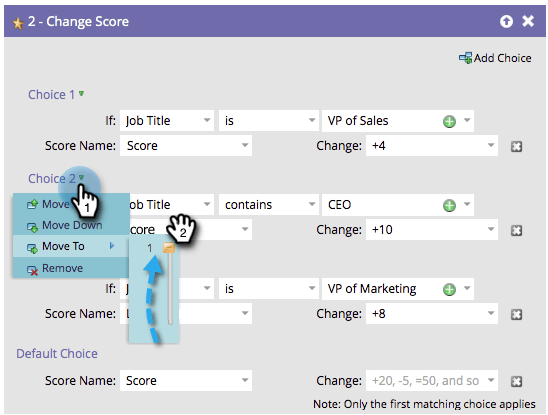
This is where most teams prevent downstream reporting distortion and misrouted follow-up.
Step #4: Tune rules to prevent weak-match overreach
Marketo matching can be helpful, but overly permissive rules create “account engagement inflation” i.e., dashboards look better, while execution gets worse.
Tune your setup to reduce:
- matches driven primarily by inconsistent company name values
- enrichment-only matches without a strong identifier
- personal email leads being force-fit into strategic accounts
A practical rule of thumb: optimize for confidence over coverage first, then expand once governance is working.
Step #5: Operationalize matching into GTM actions
Once match quality is stable, move from reporting to activation. Use matched accounts to drive workflows such as:
- SDR alerts when a target account surges in engagement
- routing based on account tier, ownership, or account-based SLAs
- ABM personalization tied to named account membership
- meeting scheduling and handoff workflows triggered by account context
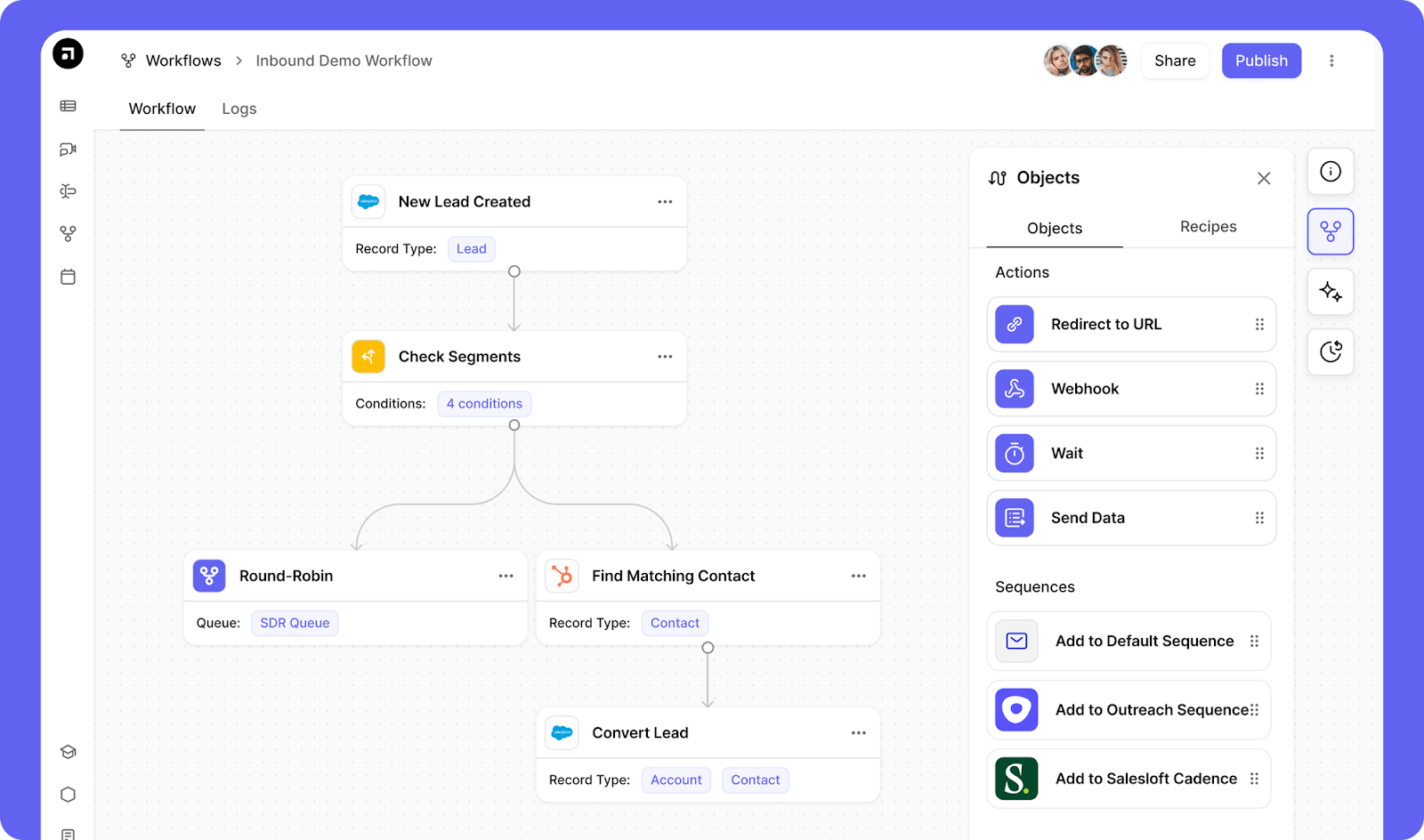
What success looks like: account engagement becomes trustworthy enough that marketing and sales teams use it to prioritize work, not just report on it.
Use cases: How GTM teams benefit from lead-to-account matching
Lead-to-account matching matters most when it improves execution, not just reporting. Below are two common GTM scenarios where accurate matching directly improves prioritization, handoffs, and speed-to-follow-up.
Account engagement spikes, but sales can’t see the buying team
Scenario: A target account starts showing meaningful activity: multiple people visit high-intent pages, register for a webinar, or engage with product content.
Problem without matching: Those actions appear as disconnected lead activity. Sales sees isolated individuals instead of an account-level surge, which delays prioritization and makes sequencing less coordinated across the buying team.
Improvement with matching: When those people are mapped to the same named account, teams can act on one account view. That enables account-based alerting, coordinated outreach, and cleaner prioritization based on buying-team activity rather than single-lead noise.
Inbound lead submits a high-intent form, but routing ignores account context
Scenario: A lead requests a demo but they belong to a strategic account already owned by an AE team.
Problem without matching: The lead routes like generic inbound (wrong queue, wrong rep, wrong SLA). That creates duplicate outreach, slower response, and confusion over ownership, especially if multiple teams touch the same account.
Improvement with matching: Matching attaches the lead to the right named account immediately, so routing and SLAs can reflect account tier and ownership. The right rep engages first, with the right urgency and the right motion.
Limitations of Marketo lead-to-account matching and solutions
TAM matching is only as reliable as your account model and identifiers—so treat it as a signal you validate before you automate.
Bottom line: validate the match, then automate the motion. Default adds the guardrails that keep weak matches from triggering misroutes and wasted outreach.
Best practices for higher match accuracy
Higher accuracy comes from governance and confidence control, not one perfect rule. The goal is to avoid false account rollups and only trigger routing, alerts, and SLAs when you trust the association.
Govern account identity (domains and hierarchy)
Maintain an approved domain list per named account (including secondary domains for enterprises and acquisitions) and define a clear parent vs subsidiary strategy that matches how sales owns accounts. Keep both documented and reviewed as your target list changes.
Gate workflows by match confidence
Only operationalize strong matches. Use confidence thresholds to control routing, alerts, and SLAs, and treat weaker matches as reporting-only until validated.
Automate execution once matches are trustworthy
After you trust the match, remove handoffs. Default can trigger workflows from Marketo form submissions (or Default forms) and run enrichment, routing, scheduling, and controlled writebacks, so account context turns into fast follow-up without smart-campaign sprawl or brittle zaps.
Bottom line: prioritize trust over coverage, then automate only what you’re confident in.
Simplify Marketo lead-to-account matching and activation with Default
Marketo TAM matching gives you account context. Default helps you turn that context into fast, reliable follow-up.
Use Marketo forms (or Default forms) as the trigger, then run enrichment, lead qualification, lead routing, sales scheduling, and controlled writebacks in one workflow, without smart-campaign sprawl or brittle handoffs.
Default complements Marketo’s core nurture and email programs; it accelerates the intake-to-meeting path.
Want faster follow-up and cleaner account-based execution? Book a demo with Default.
Conclusion
Former pro Olympic athlete turned growth marketer. Previously worked at Chili Piper and co-founded my own company before joining Default two years ago.
Run revenue as an engineered system
Revamp inbound with easier routing, actionable intent, and faster scheduling